



Customer Order Manager
Automates end-to-end customer order processes, from intelligent intake and real-time status updates to proactive issue resolution, ensuring accuracy and enhancing customer satisfaction.

The Challenge Today
Most companies still receive customer purchase orders in clunky, inconsistent formats—emails with PDFs, images, Excel sheets, and the occasional messy fax. Teams waste hours opening attachments, retyping details, checking part numbers, converting units, and clarifying mistakes with customers. What should be a smooth flow of incoming orders often becomes a bottleneck, prone to errors and delays.
What This Worker Uses:

Microsoft Outlook

Gmail
CRM

Salesforce

ServiceNow

Hubspot
ERP

IFS

Microsoft Dynamics
Images

Microsoft Powerpoint

Microsoft Word
Collaboration

Slack

Microsoft Teams

Microsoft Outlook

Notion

Jira
Documents
IFS

Google Drive
How It Works
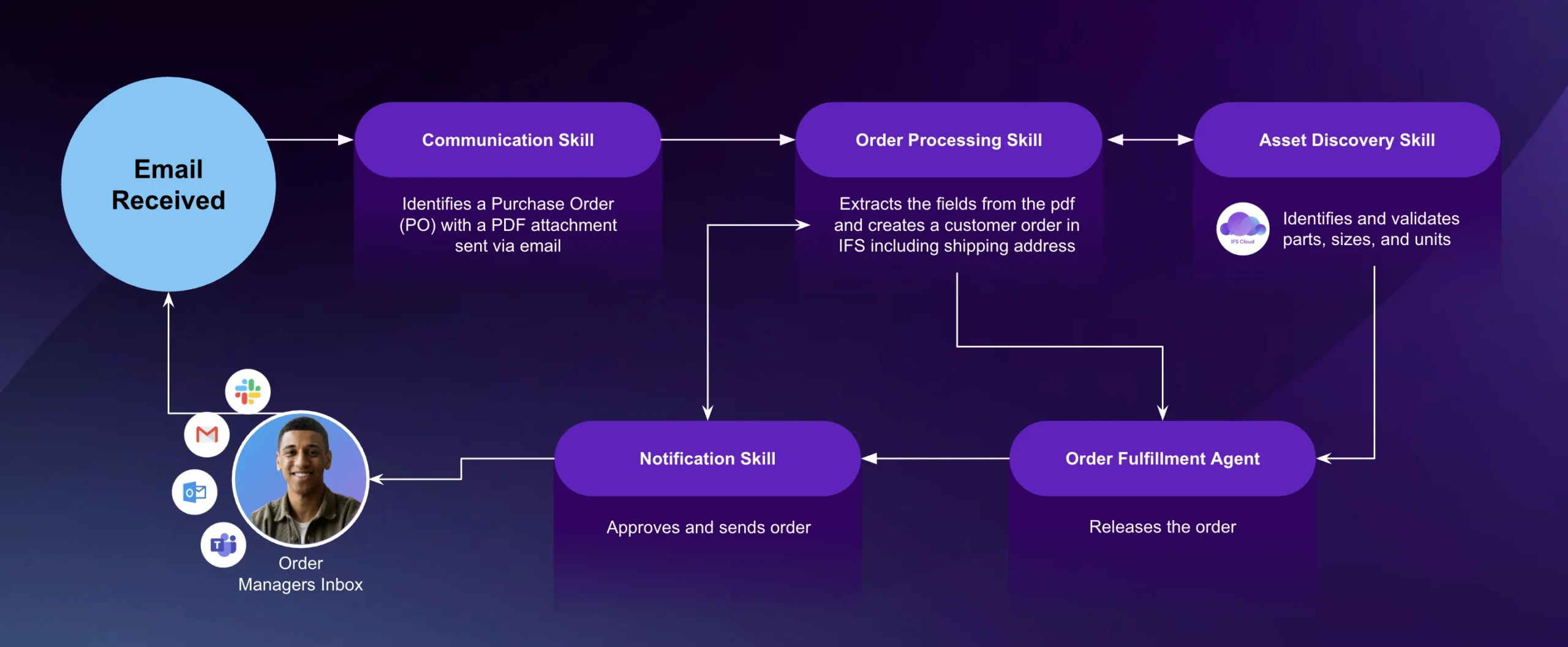
The Customer Order Manager turns unstructured, manual order intake into a fast, reliable, and error-resistant AI-powered workflow that connects directly to your ERP.
-
 Ingest emails & extract attachments: Captures orders as they arrive.
 -
 Image-to-text parsing: Reads PDFs, scans, and images with OCR.
 -
 Validate customer data: Matches orders against existing customer records.
 -
 Validate product & quantity: Cross-checks product codes, units, and prices.
 -
 Identify & resolve exceptions: Flags unclear details for quick resolution.
 -
 Create orders: Generates unreleased sales orders directly in ERP.
 -
 Trigger workflows: Pushes validated orders into fulfillment.
 -
 Notify customers & teams: Sends acknowledgments and proactive alerts.
Key Problems Solved

Eliminates manual data entry from unstructured purchase orders.

Reduces errors from mismatched part numbers, unclear units, or missing details.

Speeds up the order-to-cash cycle by automating intake and validation.

Prevents bottlenecks in high-volume or peak-season ordering.

Improves customer satisfaction with faster confirmations and fewer mistakes.
Smarter Order Entry Which Goes Beyond RPA
Business Value and Impact
- Faster processing – Orders flow in minutes, not hours.
- Reduced costs – Less reliance on manual clerical work.
- Higher accuracy – Automated validation minimizes human error.
- Scalable – Works for big-box retailers, small shops, and everything in between.
- Customer trust – Reliable confirmations and timely communication.
Why It Matters
The Customer Order Manager turns order chaos into clarity — cutting manual work, boosting accuracy, and ensuring every customer gets their order right, fast, and on time.


